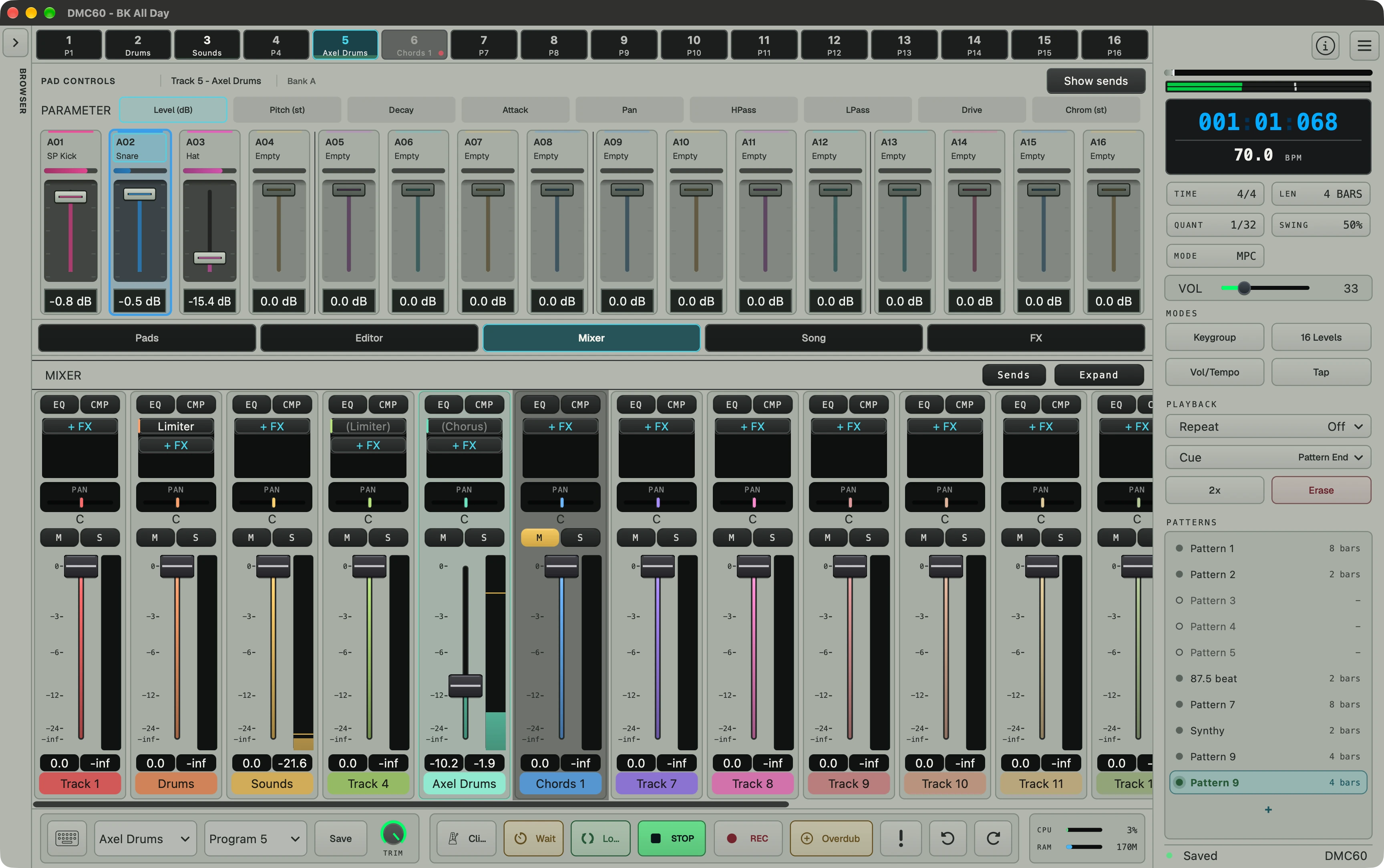
MAC / WINDOWS

DMC60
drum machine & sampler

A folder of samples is a playable kit.

Point DMC60 at a folder and it builds the program — pads filled, banks laid out, ready to play. Chop it, add 21 analog-modeled 808- and 909-style drum voices, sequence it with hardware swing, and run every voice through a 12-bit / 26.04 kHz engine with SSM2044-style filtering.

No card needed for the trial. Buy, and your license key and download links arrive by email right away.

Standalone · VST3 · AUmacOS & WindowsAbleton Link CompatibleFree 14-day trial$89 intro · $129 after Sep 30
Overview · Watch the demo
INTRODUCTORY OFFER
$89$129

Introductory price through September 30, 2026. It goes to $129 after that.

No refunds — so try it first. The 14-day trial is the full app, and it needs no credit card.

ONE LICENSE INCLUDES
Activations3 Computers
FormatsStandalone · VST3 · AU
PlatformsmacOS · Windows
UpdatesFree through the current major version
TRY IT FIRST

Get a 14-day free trial

Not a demo — the complete app for 14 days on up to 2 machines, macOS or Windows. Saving and export both work; nothing is disabled. No credit card. Sign up, click the confirmation link we email you, and your key and downloads land together — the 14 days only start when you first activate, so a key you grab today keeps for 30 days.

Create kits

Load a folder.
Make a beat.

Your sample folders become playable kits. No mapping, no trimming, no renaming.

THE PROBLEM

Sample kits take too long to create.

Most samplers make you drag, map, trim, rename, save, and then do it again for the next kit. The sound you wanted is twenty minutes behind the file management.

THE APPROACH

Folders become programs.

Point DMC60 at one folder, each subfolder, or a whole library tree. It creates ready-to-play .dmcpgm programs automatically.

THE RESULT

The sound, without the setup.

12-bit character, hardware swing, choke groups, and hands-on MIDI control — without losing a day to file management.

Sound character
26.04 kHz

Internally downsampled.

Every sample is converted to 26.04 kHz with Lagrange interpolation and a ~13 kHz anti-alias path. The aliasing that comes with it is part of the sound, not something to fix.

12-bit

Quantized on purpose.

A 12-bit signal path (–2048 / +2047) restores the bite of early hardware samplers. Drive with musical break-up. Loud sources punch.

SSM2044

Ladder filter, modeled.

Four-pole, 24 dB/oct, with smooth resonance and self-oscillation. The same circuit family that gave a generation of drum machines their appeal.

Most plugins try to make samplers sound clean. DMC60 does the opposite. Sample-rate conversion, bit reduction, ladder filter, drive: the whole pipeline is tuned to get out of the way and let the sound speak.

ENGINE
Internal rate26.04 kHz
Bit depth12-bit
FilterSSM2044, 4-pole
PolyphonyUnlimited voices, hardware-true
Voice stealingOldest-priority, click-free
Choke groupsPer-pad mute groups
Sampler

16 pads. 8 banks.
Unlimited programs.

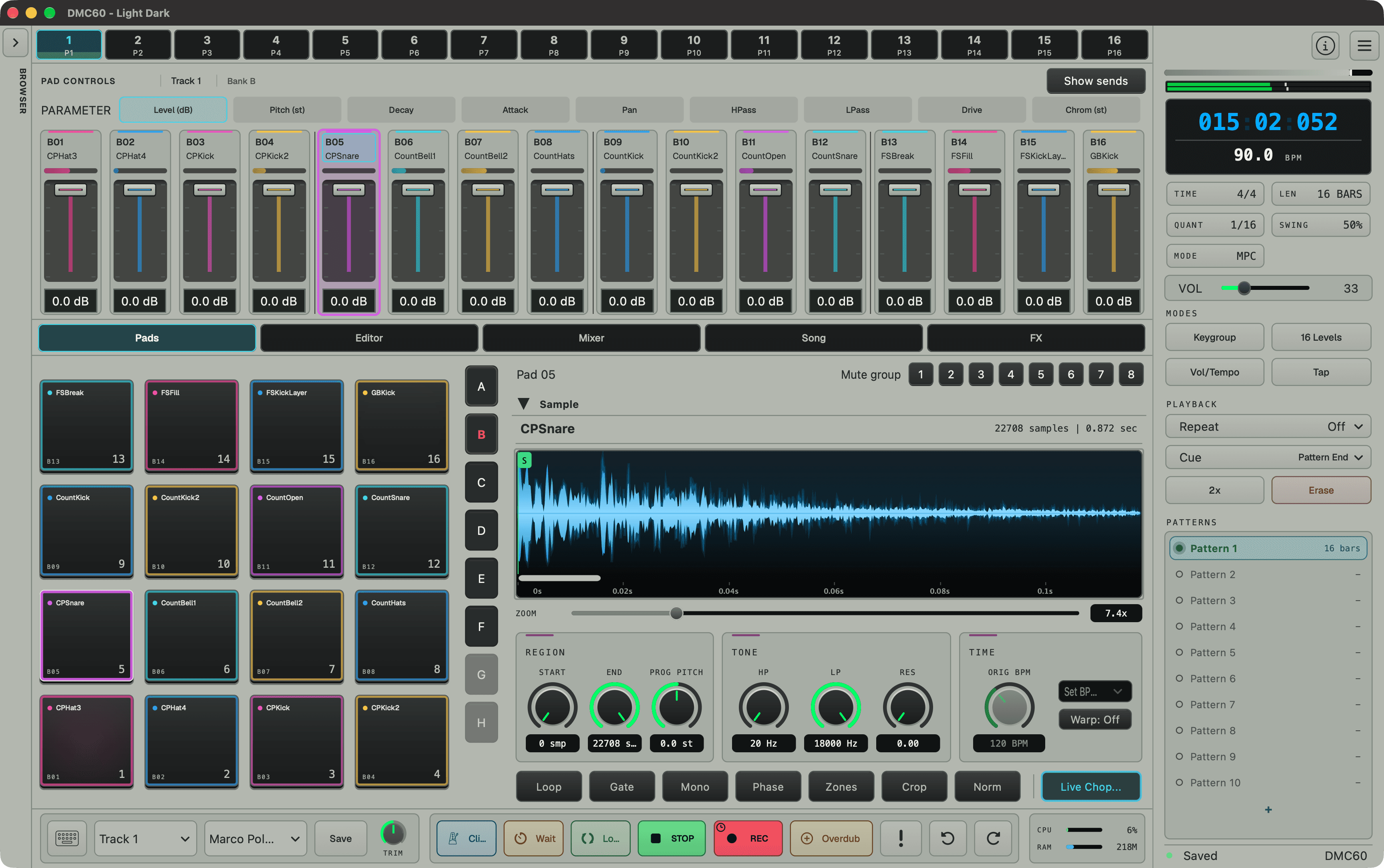
128 sample slots per program, laid out the way drum machines always were: pads on the bottom row, banks A–H on the wing, programs as your kits. Pitch, loop, ADSR, filter, drive, and pan are all per-sample, and all live.

Save kits as .dmcpgm programs with embedded samples, tags, and authoring metadata. Browse a factory library or your own, search by name or tag.

16
Pads per bank
8
Banks (A–H)
Unlimited
Programs
128
Total sample slots
±7
Semitones tune
per sample
RAM-limited
Sample time
limited by available memory
CHOP
LiveTap pads to the beat to drop slice points
Non-destructiveMarkers only — the sample is never cut
Auto-divideEqual slices
Transient detectSpectral flux, 1024 FFT
Sensitivity0.0 – 1.0, adjustable
Min gap30 ms default
SnapZero-crossing, click-free
ManualDrag markers on waveform
OutputSlices → pads, mute group

Drop a break in.
Chop it four ways.

Hit pads to the beat and DMC60 drops slice points in real time. It never cuts the sample: markers are all that change. You can also let the onset detector mark every transient, divide by count, or place markers by hand. Slices land on pads in a shared mute group, ready to play.

NEW · SAMPLE FROM INPUT

Sample straight
off the interface.

Record a hardware synth, a turntable, or the mic on your desk straight into a pad. Pick a source and arm it, manually or on a level threshold. Pre-roll keeps the attack intact. Capture, trim the take, and assign it. It lands as a 12-bit / 26.04 kHz sample, same as anything you load.

SAMPLE FROM INPUT · STANDALONE
SourceAny input channel, or a stereo mix
InputsRename each — the label follows the port
ArmManual, or threshold-triggered on level
Pre-roll0.5 s before the trigger — no clipped transient
LengthNo time cap
MonitorHear the input through the master
MeteringLive input peak meter
PreviewWaveform + trim before you assign
Convert26.04 kHz / 12-bit on the way in
AUTO-CLIP LOOPER
Clip length1 · 2 · 4 · 8 bars
TimingLocked to project tempo, 4/4
Count-offOne bar in, then discarded
AssignEach clip to the next pad, in order
ReachFills banks A–H, up to 128 slots
LevelsQuiet clips auto-normalized on capture
StopManual, or when every slot is filled
NEW · RECORD TO THE GRID

A jam becomes
a chop kit.

Flip on Auto clips and the sampler becomes a bar-synced looper. Pick a clip length and hit record: DMC60 runs the metronome, captures live, and slices the take into tempo-locked bar clips. Each one lands on the next pad, rolling from bank A clear through H, up to all 128 slots. No trimming, no editor step.

Programs
BATCH PROGRAM BUILDER

Point at a folder.
Get a kit.

Building a kit by hand is the slowest part of most drum machines. Hand DMC60 a folder of WAV / AIFF / FLAC files and it builds a finished .dmcpgm program: pads filled, banks laid out, ready to play. Hand it a whole sample library and it builds every kit in one batch pass.

An afternoon of dragging files into slots becomes a single pass.

CREATE PROGRAMS · 3 MODES
This folderBuild one program from the samples in a single folder.
Each subfolderEvery kit folder becomes its own .dmcpgm.
RecursiveWalk the tree. Every leaf folder of audio becomes a kit.
InputsWAV · AIFF · AIF · FLAC
Auto-split128+ files → multiple programs
Drag-dropFolder onto any pad
Library-wide
Convert a vendor pack of hundreds of folders into a complete DMC60 program library in one pass.
1·click
No mapping
Files are sorted naturally and placed in pad order. Run, browse results in the log, hit a pad.
On the fly
Drop a folder onto a pad and DMC60 fills the pads from that point — same engine, instant kit.
Watch

See it
in action.

Real workflows, start to finish: a folder of samples to a playable kit, and a break to a chopped beat.

Batch program builder
Sample chopping
Synth
NEW · KEYGROUP ENGINE

Any sample becomes
an instrument.

Keygroup programs stretch a sample chromatically across the full 128-note MIDI range: concert pitch, the whole keyboard, not just 16 pads. Behind it sits a real synth voice, with three tempo-syncable LFOs with delay and fade-in, two assignable mod envelopes, and a 16-slot modulation matrix. Route velocity, aftertouch, mod wheel, key-track, and random to pitch, filter, amp, pan, and more.

Stack up to 7 detuned unison voices with stereo width, and glide between notes with legato. Pick your oscillator flavor: Clean (anti-aliased) or Vintage (naive, 12-bit crushed). The factory preset catalog covers basses, leads, pads, keys, plucks, and FX.

KEYGROUP SYNTH
RangeFull 128-note MIDI, concert pitch
LFOs3 · free or tempo-synced, 1/1 – 1/32 + triplets
Mod envelopes2, assignable
Mod matrix16 slots · 8+ sources, 12+ destinations
OscillatorsClean (PolyBLEP) · Vintage (12-bit)
Unison1 – 7 voices, stereo width
GlidePortamento + legato mode
EnvelopesExponential, hardware-style RC curves
PolyphonyPer-keygroup limit, mono to 8
FilterSame SSM2044 ladder as the drums
88
Keys, not pads
Record from a full-size controller and every octave lands in the pattern — notes are stored by absolute MIDI pitch.
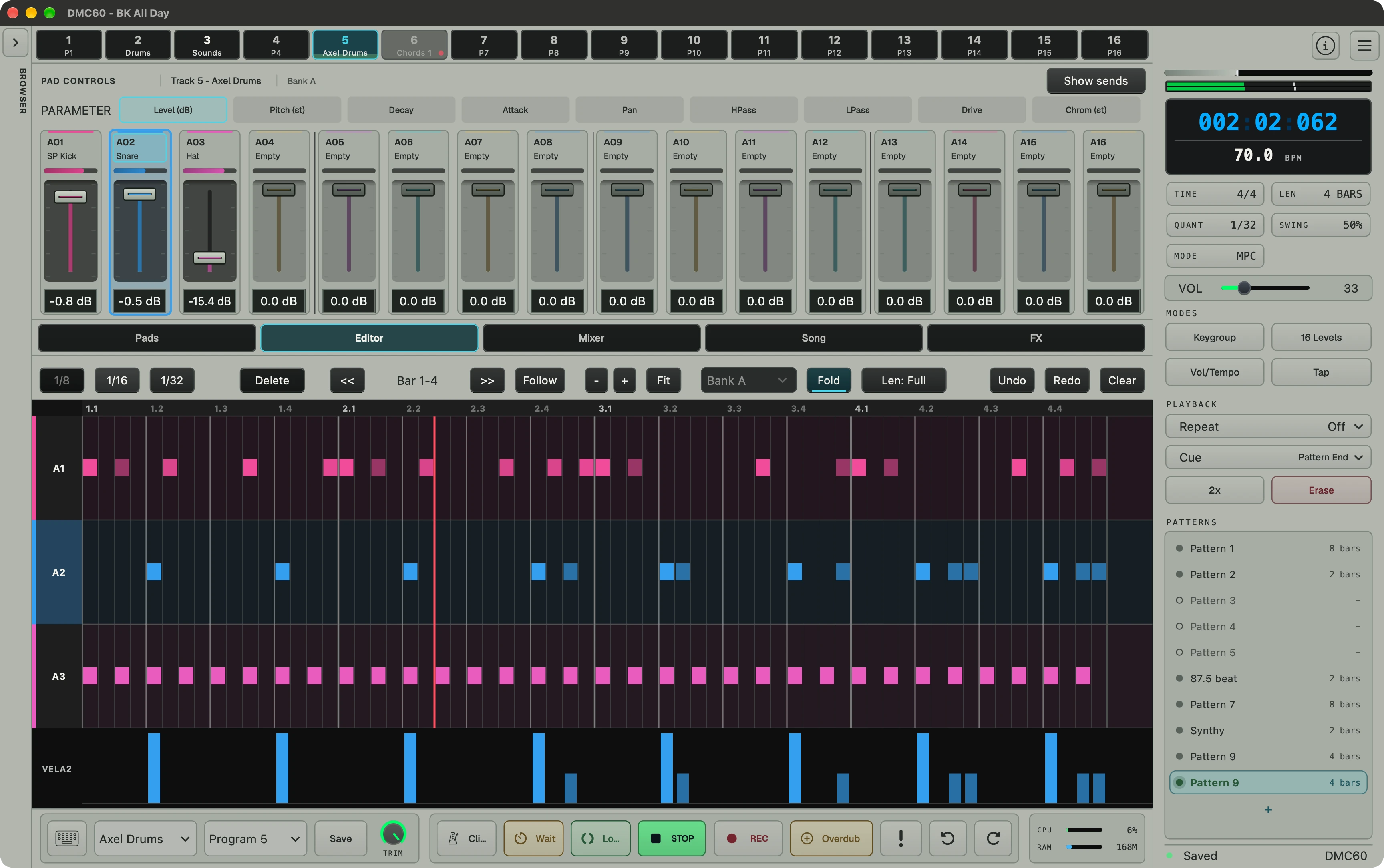
Piano-roll editing
Keygroup tracks flip the step grid into a chromatic note view — semitone rows, shaded black keys, octave scrolling.
3ms
Click-free voices
Synth voices fade out in 3 ms instead of hard-cutting when stolen or retriggered. Drums keep the classic instant choke.
Drum synth
NEW · 21 ANALOG-MODELED VOICES

The classics,
synthesized.

Any pad can play one of 21 analog-modeled drum voices in the style of the two most famous drum machines ever made — no sample needed. The models are derived from the original voice circuits — bridged-T rings, swept oscillators, metallic square banks — so every knob shapes the sound the way the hardware did.

Each voice gets its model's authentic controls — Tune, Decay, Tone, Snappy, Attack, Accent — plus a Vintage/Clean character switch. Velocity drives hardware-style accent: harder hits get more saturation, click, and pitch-sweep depth, not just more level. Drum synth pads mix freely with sample pads and run through the same sequencer, mixer, and effects.

Read the Drum Synth manual
DRUM SYNTH
Voices21 models · twelve 808-style, nine 909-style
808 familyKick, snare, clap, toms, congas, percussion, hats, cymbal
909 familyKick, snare, toms, rimshot, clap, hats, crash, ride
ControlsTune · Decay · Tone · Snappy · Attack · Accent
CharacterVintage (12-bit) or Clean, per voice
AccentVelocity-driven saturation, click, sweep depth
PlacementRight-click any pad · mixes with samples
EngineSame sequencer, mixer, FX, and 16 Levels
2
Factory kits
TR-808 Kit and TR-909 Kit presets: 16 pads each, tuned tom rows, and open/closed hats pre-wired to choke each other like the hardware.
4
Starter grooves
Loading a factory kit drops House, Boom Bap, Electro, and Miami Bass beats into empty pattern slots — non-destructive, your patterns are never touched.
6-bit
Real 909 architecture
The 909-style hats, crash, and ride play 6-bit material through an analog-style VCA — closed and open hats share one source, like the original.
Sequencer

99 patterns,
99 mixes.

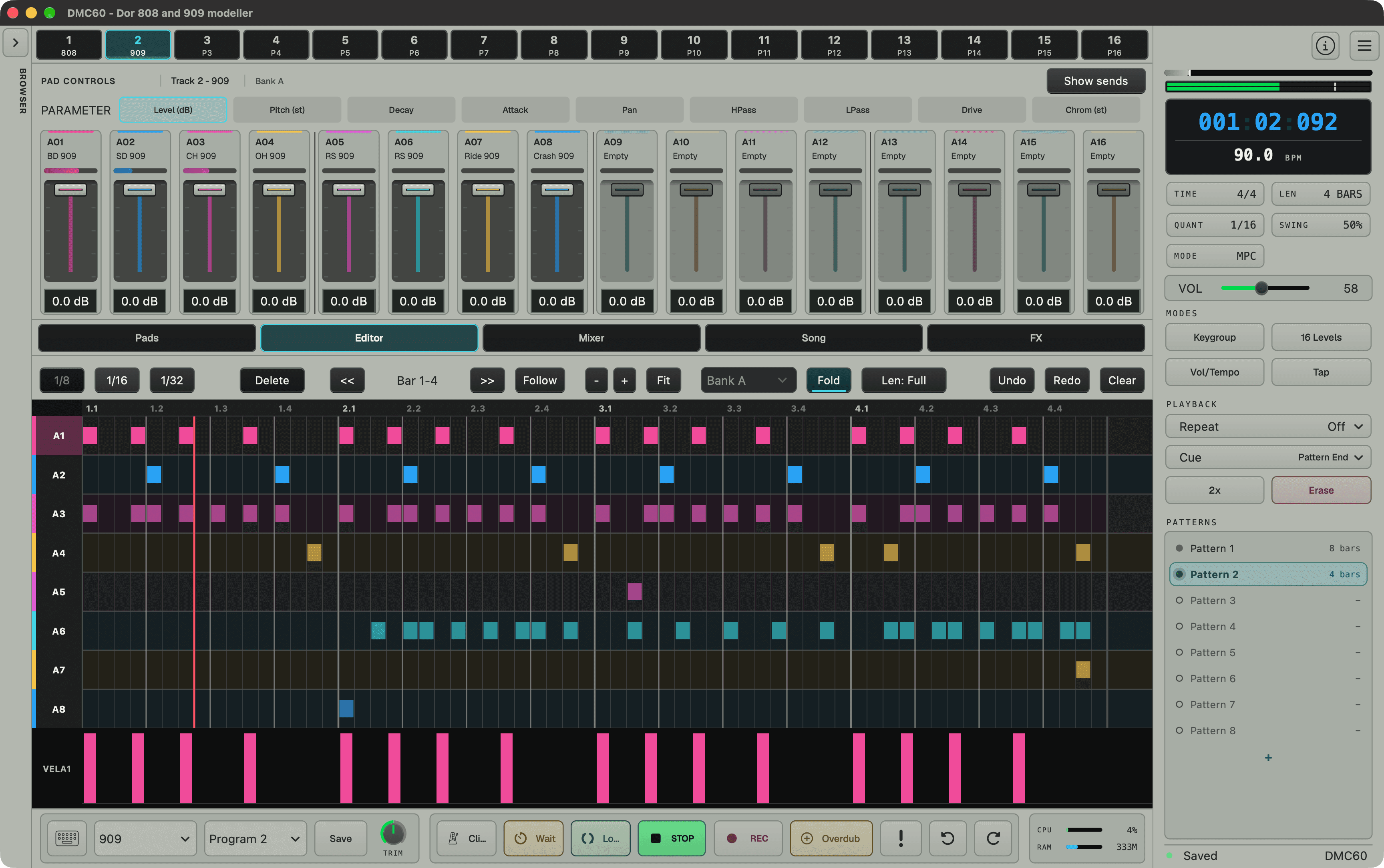
Every pattern carries its own mixer state: levels, pans, sends, mutes. Switching patterns swaps the mix with the beat, so there is no snapshot juggling and no extra recall step. Underneath, a 96 PPQN engine drives customizable pattern lengths up to 4 bars, with full undo/redo, count-in, metronome, and an erase mode that scrubs notes under your fingers as it plays.

Swing 50%Swing 54%Swing 58%Swing 63%Swing 67%Swing 71%
SEQUENCER
Patterns99
Pattern lengthCustomizable, up to 4 bars
Resolution96 PPQN
Per-pattern mixIndependent mixer state per pattern
Tempo40 – 240 BPM, per step
Mix snapshots100, with crossfade
RecordingReal-time · Step · Overdub · Erase
Note repeatTempo-synced, 1/4 – 1/16T
16 LevelsMPC-style per-step parameter locks
HistoryPattern undo / redo

Patterns become
arrangements.

Song mode is a list, not a maze. Add a pattern, set how many times it repeats, and drop tempo and mix moves between rows. Loop any region while you tweak it. Building a full arrangement takes about as long as remembering which bar you were on.

SONG MODE
Songs100
Song lengthUnlimited rows
Per-row repeats1 – 999
Tempo per row40 – 240 BPM
Mix per rowRecall any pattern's mix
Loop regionAny contiguous range, live
Edit while playingInsert · duplicate · reorder rows
Mixer

A console,
not just faders.

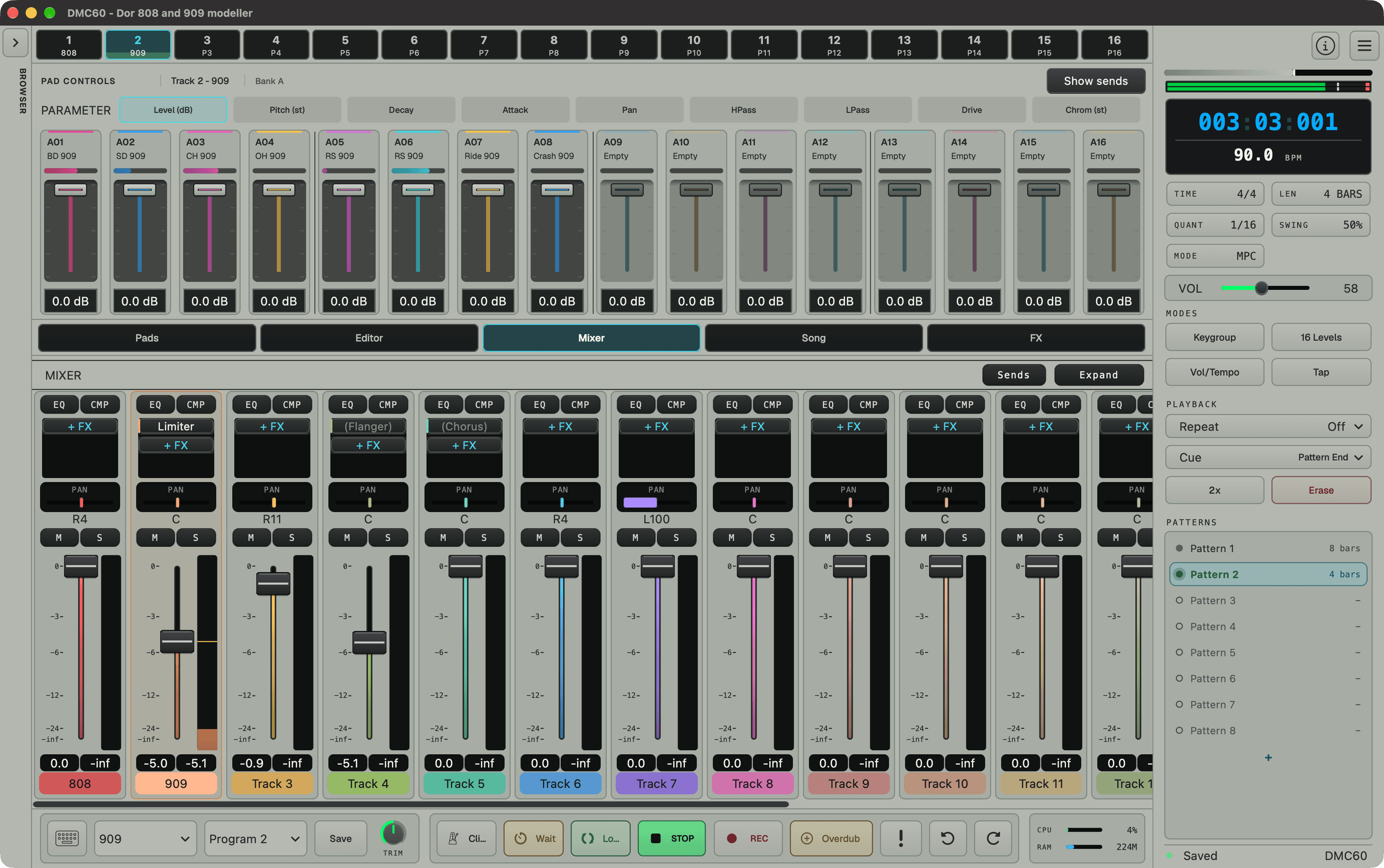
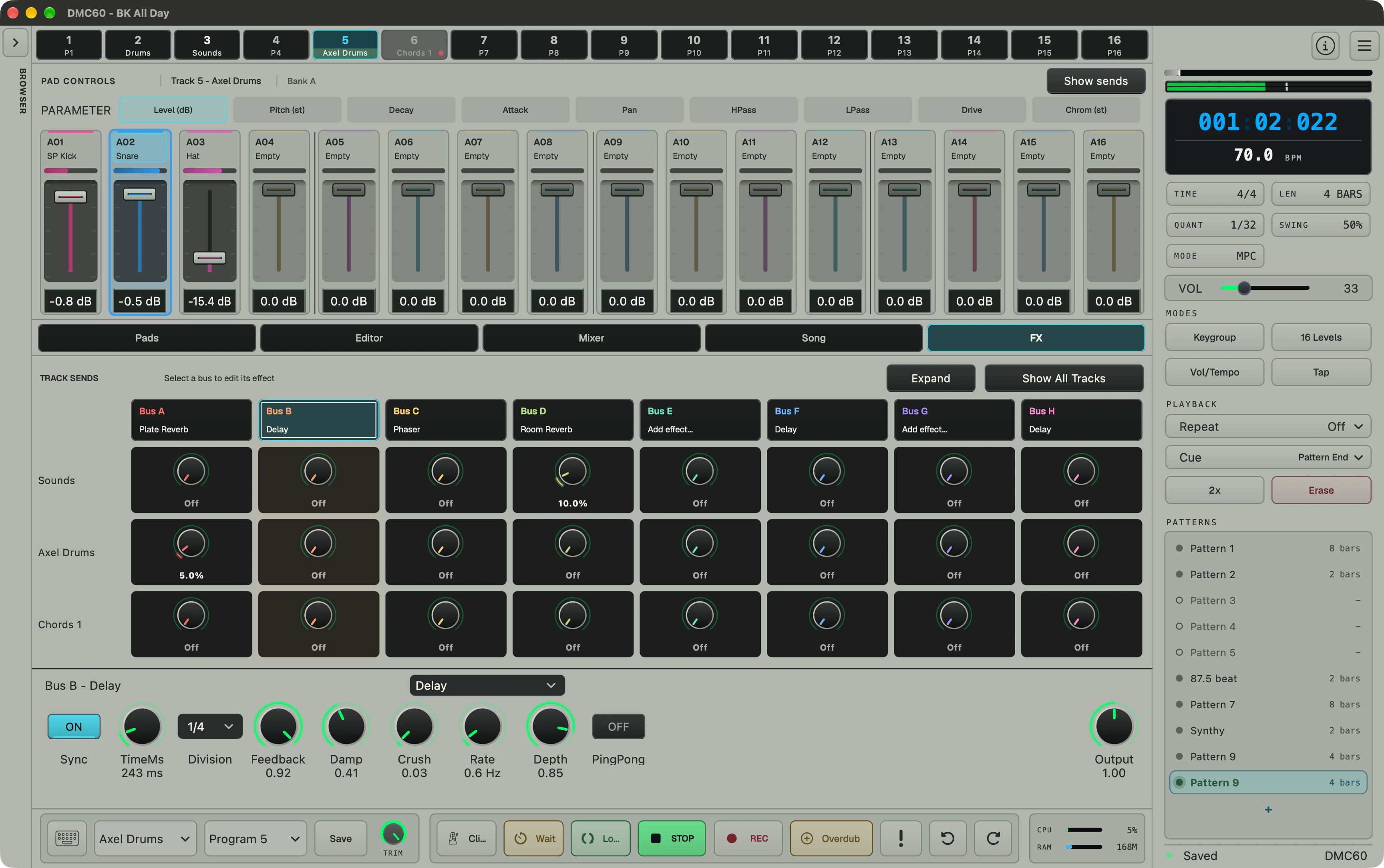
Every track gets a 6-band EQ: high-pass, two shelves, two mids, low-pass, switchable pre or post fader. The master runs through a glue-style compressor with auto-gain. Eight send buses carry a tempo-synced delay and a plate reverb, with per-track send bars right above the faders.

The mixer expands to full window height with DAW-style fader scaling, and every pattern still recalls its own complete mix.

MIXER & FX
EQ6-band per track · HPF, shelves, mids, LPF
EQ routingPre or post fader
CompressorGlue-style bus comp, auto-gain
GR meteringNeedle gain-reduction meter
Send buses8, mixed back to master
Bus effectsTempo-synced delay · Plate reverb
SendsPer-track bars above the faders
ViewFull-height expand, DAW-style faders
Hardware

Plays nicely with
the controller you love.

Plug in any class-compliant MIDI controller. Pads trigger voices. Knobs and faders address volume, pan, tune, ADSR, filter, drive, master, and tempo over a fixed CC map on Channel 4, and aftertouch is wired through. No mapping screen, no JSON files.

Arturia MiniLab 3 gets first-class macros: 8 knobs and 4 faders drive the synth engine on keygroup tracks, or the selected pad on sample kits. The on-screen controls follow your hands in real time. Hot-plug detection brings any controller online mid-session, and a built-in MIDI monitor shows every incoming note and CC.

Arturia KeyLab mkII turns into a hands-on mixer. The 8 channel faders drive the pad fader bank in every mode — Mix, Pitch, Decay, Attack, Pan, Filter, Drive — with a button to flip between pads 1–8 and 9–16, soft fader takeover, and the master fader on master volume. Download the KeyLab template and import it with MIDI Control Center.

Stay locked to the rest of your rig. In a DAW, a Host Sync toggle lets DMC60 follow the host transport — play, stop, position, tempo — or run its own clock instead. Standalone, turn on Ableton Link to sync tempo, beat, and phase with other apps and devices on your network. No cables, no clock master, and a live count of connected peers.

MIDI MAP · CHANNEL 4
CC14Volume
CC15Pan
CC16Tune
CC17Attack
CC18Decay
CC19Filter cutoff
CC20Drive
CC21Master volume
CC22Tempo
MacrosMiniLab 3 · 8 knobs + 4 faders, CC20–31
FadersKeyLab mkII · 8+1 faders + bank toggle, CC70–79
Ableton LinkTempo + phase sync over the network
Host syncFollow DAW transport, or run free
Studio

Built to live in,
not just to demo.

A floating sample editor with zoom, start / end, and loop handling. An on-screen keyboard with QWERTY mapping for laptop jams. A preset browser with search and tags. Five LCD color themes, a scalable UI, and persistent window state. The things you need when DMC60 is open all day.

DMC60 keeps itself current. It checks for updates on launch, verifies the download, and hands you the installer. And when something feels off, Help → Send Feedback files a bug report straight from the app, with DAW, OS, and session details attached automatically.

Work on more than one machine? Optional cloud sync keeps your projects and programs identical across them, studio desktop to laptop and back. Every license and trial includes 5 GB. It is one click in preferences, and nothing uploads unless you ask.

5
LCD themes
Red · Amber · Green · Blue · White
75–200%
UI scale
QWERTY
On-screen keyboard
velocity-aware
5 GB
Cloud sync
projects + programs · included
Why it holds up
KIT BUILDING

Point it at a folder and get a playable program back, instead of mapping 128 samples by hand.

SOUND CHARACTER

The 12-bit engine, 26.04 kHz conversion, drive, and SSM2044 filter give clean samples the feel of a dedicated drum box.

SEQUENCING

Per-pattern mixer states, customizable bar lengths, swing, song rows, and real-time erase keep the sequencer working past the first demo.

Reviews

Used DMC60?
Say so here.

Running DMC60? Tell other producers how it fits your workflow. Reviews are published after a quick moderation check.

WRITE A REVIEW
Your rating
Pricing & download
INTRODUCTORY OFFER
$89$129

Introductory price through September 30, 2026. It goes to $129 after that.

No refunds — so try it first. The 14-day trial is the full app, and it needs no credit card.

ONE LICENSE INCLUDES
Activations3 Computers
FormatsStandalone · VST3 · AU
PlatformsmacOS · Windows
UpdatesFree through the current major version
AU · macOS
Audio Unit
Music Device
macOS & Windows
VST3
Instrument · Sampler · Drum
No host required
Standalone
macOS & Windows
WAV · AIFF · 24-bit · 32-bit
Bounce
Offline render with tail
FAQ

Can I try it before buying?

Yes, and you should — sales are final, so the trial is how you find out. It gives you the complete app for 14 days on up to 2 machines, macOS and Windows, with nothing disabled: saving and export both work. No credit card required. Sign up with your email and the trial key and downloads arrive together.

Which DAWs are supported?

Any DAW that loads VST3 or AU instruments — VST3 on macOS and Windows, AU on macOS. The standalone app works without a host.

What does one license include?

Everything. Standalone, VST3, and AU are included in a single license, and it covers both macOS and Windows — no separate platform purchases. One license activates on up to 3 computers.

How much does DMC60 cost?

The introductory price is $89 for a perpetual license, up from a regular price of $129, and it runs through September 30, 2026. UK customers are charged in pounds: £69 introductory, £99 regular. A $9.99/month subscription is also available if you would rather not pay up front.

Perpetual license or monthly subscription?

Buy the perpetual license if you plan to keep using DMC60 — at the $89 introductory price it costs less than nine months of the subscription and it never expires. The $9.99/month option makes sense if you want it for a single project or would rather spread the cost. Both unlock the same app.

Do you offer refunds?

No — all sales are final. That is exactly why the 14-day trial exists, and why it is the complete app with nothing disabled: try it on your own tracks, in your own DAW, on up to 2 machines before you spend anything. No credit card is required to start.

Are updates free?

Yes. Every license includes free updates through the current major version.

Do I need a license key?

Yes. When you buy DMC60, your license key and download links arrive by email right after checkout. A paid license activates on up to 3 computers. If you want to try before you buy, a free 14-day trial key runs the complete app on up to 2 machines, saving and export included.

Can I use my own samples?

Yes. WAV, AIFF, AIF, and FLAC are supported, including folder-to-program batch creation.

Is it drums only?

No. Keygroup programs stretch any sample chromatically across the full 128-note MIDI range and run it through a real synth voice: 3 LFOs, 2 mod envelopes, a 16-slot modulation matrix, unison, and glide. The factory preset catalog covers basses, leads, pads, keys, and plucks.

Can I record my own audio into a pad?

Yes. The standalone app samples straight from your audio interface. Pick an input, arm it manually or with a level threshold, trim the take, and drop it onto a pad — pre-roll makes sure the attack survives. It converts to DMC60's 12-bit / 26.04 kHz engine on the way in. Turn on Auto clips and it becomes a bar-synced looper, slicing your take into 1, 2, 4, or 8-bar clips at the project tempo and spreading them across pads, filling banks A–H up to all 128 slots.

Can I sync DMC60 with other apps and hardware?

Yes. The standalone app supports Ableton Link, so it stays locked to the tempo, beat, and phase of other Link-enabled apps and devices on your network: Ableton Live, a second laptop, an iPad, or a groovebox. As a plugin, Host Sync follows your DAW transport instead.

How does cloud sync work?

Click Sync Now in Options > Preferences and DMC60 uploads your projects and programs to secure cloud storage tied to your license. That covers the default Documents/DMC60 folders plus any Favorite Locations. On another machine, install DMC60, activate with the same license, and sync — your library is there. Every license and active trial includes 5 GB. It is entirely optional: nothing uploads unless you click Sync, and a Delete Cloud Data button removes everything server-side whenever you want.

Is this an SP-1200 clone?

No. It is a software instrument inspired by the workflow and sonic attitude of early sampling drum machines, with its own engine and modern plugin workflow.

INTRO · ENDS SEP 30
$89$129