DMC60 1.5: Play Chords and Stay in Key with Scales & Chords
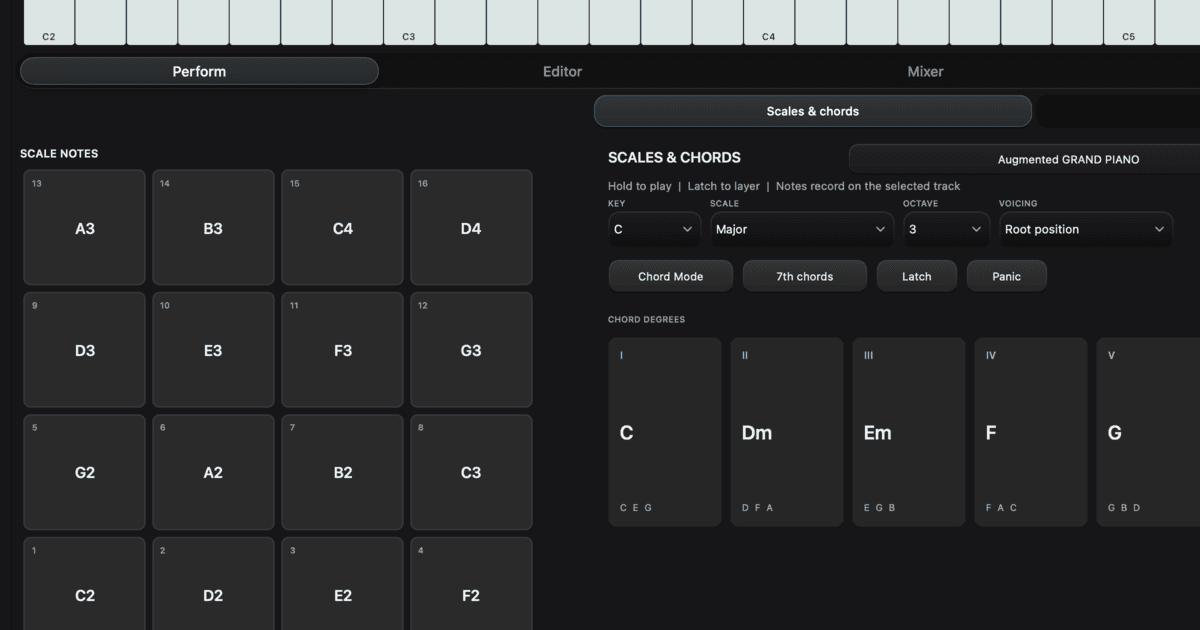
DMC60 1.5 gives every instrument track a Scales & Chords panel. Pick a key and a scale, and the pads, the chord buttons and the keyboard all follow it. It works with the built-in instruments and with the VST3 and Audio Unit instruments you can now load on instrument tracks. It is a free update for every license holder.
**Choose a key and a scale** Set the key to any of the 12 notes, then choose Major, Natural minor, Dorian, Mixolydian, Harmonic minor, Phrygian or Lydian. Octave picks the register, from 0 to 8.
**Scale notes on the pads** The 16 scale note pads lay the scale out in order, so every pad is a right note. Melodies and bass lines come quickly when nothing you hit is out of key.
**Seven chords, one per degree** The chord degree pads hold the seven chords of the scale, from I to VII. In C major that is C, Dm, Em, F, G, Am and Bdim, and each pad shows the notes it will play. Turn on 7th chords to add the seventh, and use Voicing to choose root position or the first, second or third inversion.
**Chord Mode and Scale lock** With Chord Mode on, a single key on the on-screen keyboard plays the full chord built on that note. Scale lock moves any key you play to the nearest note in the scale, so the keyboard cannot go out of key either.
**Latch, record and Panic** Hold a pad to play it, or turn on Latch to keep chords sounding and layer them. Press a latched chord again to release it. Notes record on the selected track, so a chord progression goes straight into the pattern. Panic stops everything that is still sounding.
Your key, scale, octave, voicing and mode settings are saved per track. Open an instrument track, choose Perform, then Scales & chords to try it.